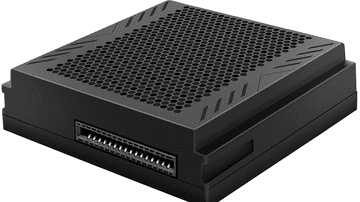
Mercedes Becker Map Pilot Europe Sat Nav Update – V24 2024–2025 SD or V23 2023–2024 Download

Product information
Update your original Mercedes-Benz Becker Map Pilot navigation system, keeping the factory screen, controls and dashboard appearance.
Choose V24 on SD card for newer map data, or V23 by download for the package with Speed Cameras and Tunnel Sight Pro.
💾 Option 1 – V24 2024–2025 SD Card
✔ Map version: V24
✔ Map database: Q2 2023
✔ Prepared SD card supplied by post
✔ Installation instructions included
✔ For supported Becker Map Pilot Generation 1.5 / Audio 20 CD / NTG4.5 systems
Requires Becker Software 2.0. Speed Cameras are not included.
V24 is available on SD card only. The card fits directly into the Becker Map Pilot module, rather than the vehicle’s normal media SD slot.
💻 Option 2 – V23 2023–2024 Download
✔ Map version: V23
✔ Map database: Q2 2022
✔ Speed Camera database included
✔ Tunnel Sight Pro included
✔ Map files and installation instructions delivered electronically
You will need a Windows PC or laptop, a USB-to-Mini-USB cable and a compatible Becker Map Pilot module.
No physical card is posted with this option.
🔧 Module Compatibility
Becker module references covered by compatibility checks include:
Generation 1
9077 / BE 9077 / M013 / M041 / M045 / M046 / M050 / M051
Generation 2
M054 / M075 / M076 / M083 / M084 / M085 / M087 / M092 / M097
A listed module number does not automatically confirm V24 compatibility. Its additional system and Software 2.0 requirements must be checked before ordering.
❌ Not suitable for Garmin MAP PILOT, COMAND, MBUX or other navigation platforms.
🚗 Typical Mercedes-Benz Applications
Selected vehicles originally equipped with Becker Map Pilot:
A-Class W176, B-Class W246, C-Class W204 / S204 / C204, CLA C117, CLS C218 / X218, E-Class W212 / S212 / C207 / A207 / V212, GL / GLS X166, GLA X156, GLK X204, ML / GLE W166, SLK / SLC R172, Sprinter C906 / NCV3 and Vito BR447.
Compatibility depends on the installed Becker module and system software, not simply the model or registration year.
🔎 Check Before Ordering
Please send:
✔ A clear photo of the Becker Map Pilot module label and model number
✔ Your current Becker software version, particularly for V24
✔ Your preferred option: V24 SD card or V23 download
We can confirm which package is suitable before you purchase.
🌍 Europe Map Coverage
United Kingdom, Ireland, France, Germany, Spain, Portugal, Italy, Belgium, Netherlands, Luxembourg, Austria, Switzerland, Denmark, Norway, Sweden, Finland, Poland, Czech Republic, Slovakia, Hungary, Romania, Bulgaria, Greece, Croatia, Slovenia, Serbia, Montenegro, Bosnia & Herzegovina, Albania, North Macedonia, Moldova, Ukraine, Belarus, Estonia, Latvia, Lithuania, Iceland, Malta, Andorra, Monaco, San Marino, Vatican City, Liechtenstein and Gibraltar.
Coverage and road detail vary by country and map edition.
📍 Speed Camera Information
The V23 download includes an offline Speed Camera database. Coverage may not include every mobile, temporary or newly installed camera, and alerts depend on system settings.
Choose V23 if you require the included camera database.
🛠️ Installation
V24 SD Card
- Confirm that the module meets the Software 2.0 and compatibility requirements.
- Remove the Becker module from its vehicle mount as directed.
- Insert the supplied SD card into the module itself.
- Refit the module and select Navigation.
- Follow the supplied instructions and on-screen prompts.
- Use the module’s Reset button only when instructed.
The SD card must remain inserted during navigation. It becomes paired after use and cannot normally be transferred to another vehicle.
V23 Download
Connect the compatible Becker module to your Windows computer using a USB-to-Mini-USB cable, then follow the supplied installation instructions.
Do not disconnect the module or interrupt power during an active update.
💬 Need Help?
For help choosing the correct Mercedes Becker Map Pilot update, contact us.
Technical specifications
| Brand | Mercedes |
Customer reviews
Excellent Verified Purchase
Download update worked superbly well, and instructions were straightforward and easy to follow. I've been meaning to do this for ages, and finally got round to it today. Excellent job, many thanks.
John Irvine | | September 2026
Worked first time
After a previous bad experience (different vendor) I was reluctant to spend more money. However, my maps really needed updating.
The experience was quick and easy. All, easy to follow, instructions were included in the download.
I had no problems and the update was done on the first attempt.
Mike Alcock | Banbury | July 2026
2023 map c204 Verified Purchase
Maps worked. Instructions were accurate. Language change and last destinations to sort at the end. Worked fine. Difficult to find maps for an old satnav which is no longer supported mainstream
Jeffrey Hall | uk | May 2026
Parfait
Map fonctionnelle, SAV très compétent pour aider si problème d installation
Soson | France | February 2026
Easy update.
Easy order. After sending in the photo and device version, I received a mail with the navi update within minutes. Had no problems updating the navi. Just followed the instructions that were sent with the update files. Everything works as it should. Thanks.
Igor | Croatia | January 2026